Ekahau Training

Ekahau Training.


  • Module 1 – Introduction and Basic Concepts of Ferramenta (Remote)

Duration: Two days

  • Module 2 – Medium – Moderate and Practical Conceits of Applications (In-Person)

Duration: Two days

  • Module 3 – Advanced – Conceitos Avançados e Práticos da Ferramenta (In-Person)

Duration: Two days

Segment

Main features

Planejamento de Rede Wi-Fi
Análise de Cobertura
Simulação de Interferência
Relatórios de Desempenho
Mapas de Calor

Full description

Request a quote

Module 1 – Introduction and Basic Concepts of Ferramenta (Remote)

For Module 1, introduction and basic concepts of the Ferramenta, it can be applied in one (01) day, meanwhile we dimension two (02) so it can be realized that the level of technical knowledge of the tour is basic and, therefore, a beacon and step-by-step explanation of the concept of the WiFi System and Solution becomes necessary in different proportions.


– Module 1: First day (9:00 a.m. to 4:00 p.m.) – Remote.

• Basic concepts on the WiFi System and Solution, to level your knowledge;

• What we need to know to use Ekahau;

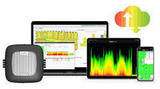
• Presentation of the tools and their functionalities.

• Understanding components:

• Addition of maps;

• Scales;

• Wall hardware;

• Area coverage;

• Auto planner;

• Channel map.


– Module 1: Second day (9:00 a.m. to 4:00 p.m.) – Remote.

• Exploring map tools, legends, graphics and import by image and PDF;

• Using Quick Select and Ações selection tools;

• Access Point configurations, adjustments and alterations;

• Creation and editing of design and attenuation materials;

• Defining and configuring network requirements;

• Defining and configuring network capacity;

• Configuring areas, devices and network usage profiles.


Module 2 – Medium – Moderate and Practical Conceits of Applications (In-Person)

For the Module 2 medium, with moderate and practical concepts of the applications, it can be applied in one (01) day, meanwhile we dimension two (02) so we can ensure that the level of technical knowledge of the turma is basic and, therefore, it becomes necessary um alignment and explanation of the basic concept of the previous module for the System and WiFi solution in different applications.


– Module 2: First day (9:00 a.m. to 4:00 p.m.) – In-person.

• Analyzing visualizations:

• Performance coverage;

• Associated access point;

• Band length and channel coverage;

• Interference and channel coverage;

• Dice rate and jitter;

• Network health and network problems;


– Module 2: Second day (9:00 a.m. to 4:00 p.m.) – In-person.

• Noise and number of APs you hear;

• Signal strength and SNR;

• Airtime, clients per AP, capacity health.

• Exploring Auto Planner and its execution definitions;

• Import of CAD files;

• Working on property creation, story editing and propagation visualization;

• Exercises.


Module 3 – Advanced – Conceitos Avançados e Práticos da Ferramenta (In-Person)

For the Advanced Module 3, with advanced concepts and practical hardware, it must be applied in (02) two days, due to the complexity of the solution and the advanced criteria and concepts that require specific techniques and knowledge for the solution of a WiFi system based on Tools Ekahau.


– Module 3: First day (9:00 a.m. to 4:00 p.m.) – In-person.

• Ideas about Site Survey.

• Active and passive Site Survey

• Running Site Survey with Sidekick;

• Exploring and configuring adapter;

• Understanding the display box in real time;

• Configuring canais varredura;

• Configuring throughput testing and latency measurement;

• Carrying out continuous and stop and go Site Surveys;


– Module 3: Second day (9:00 a.m. to 4:00 p.m.) – In-person.

• Analyzing Wi-Fi networks with Sidekick and Spectrum;

• Exploring Survey Inspector;

• Recording and research filters;

• Active research results.

• Working with GPS;

• Configurations;

• Maps and coordinates.

• Exercises

• Ekahau Capture (only for packet connect);

• Ekarau Cloud (only for packet connect).

Request a quote

By clicking "Submit," you agree to allow Software.com.br to contact you using the information provided to send quotes and communications related to your order. For more details on how we protect and use your data, please see our Privacy Policy. Privacy Policy and Terms of Use

Related products

Hire faster and with confidence.

Automate resume screening and find ideal candidates for your organization.

  • Close top talent 40 % faster
  • Stay compliant and safe
  • Candidates verified in less than 36 hours


Learn more about these topics with the description below.


Network mapping software designed to map your network automatically

Main features

  • Automate device discovery and mapping;
  • Create multiple maps from a single scan;
  • Perform multi-tier network discovery;
  • Automatically detect changes in network topology;
  • Export network diagrams to Visio;
  • Addressing PCI compliance.


.NET Barcode Generator is a professional .NET barcode generator component for Visual Studio that allows you to easily design, generate, and create linear and 2D barcodes in your .NET projects. Generate, create, print, and draw barcode images in Visual Studio .NET projects.


By clicking "Submit," you agree to allow Software.com.br to contact you using the information provided to send quotes and communications related to your order. For more details on how we protect and use your data, please see our Privacy Policy. Privacy Policy and Terms of Use

en_US